> ## Documentation Index
> Fetch the complete documentation index at: https://docs.opendot.ai/llms.txt
> Use this file to discover all available pages before exploring further.
# Agent Studio
> Create agent identities and prepare their runtime configuration.
Agent Studio is the first step in the OpenDot flow. It creates agent identities
that become the anchor for pipeline tuning, model settings, knowledge
configuration, live testing, and hardware binding.
 ## What you see in the UI
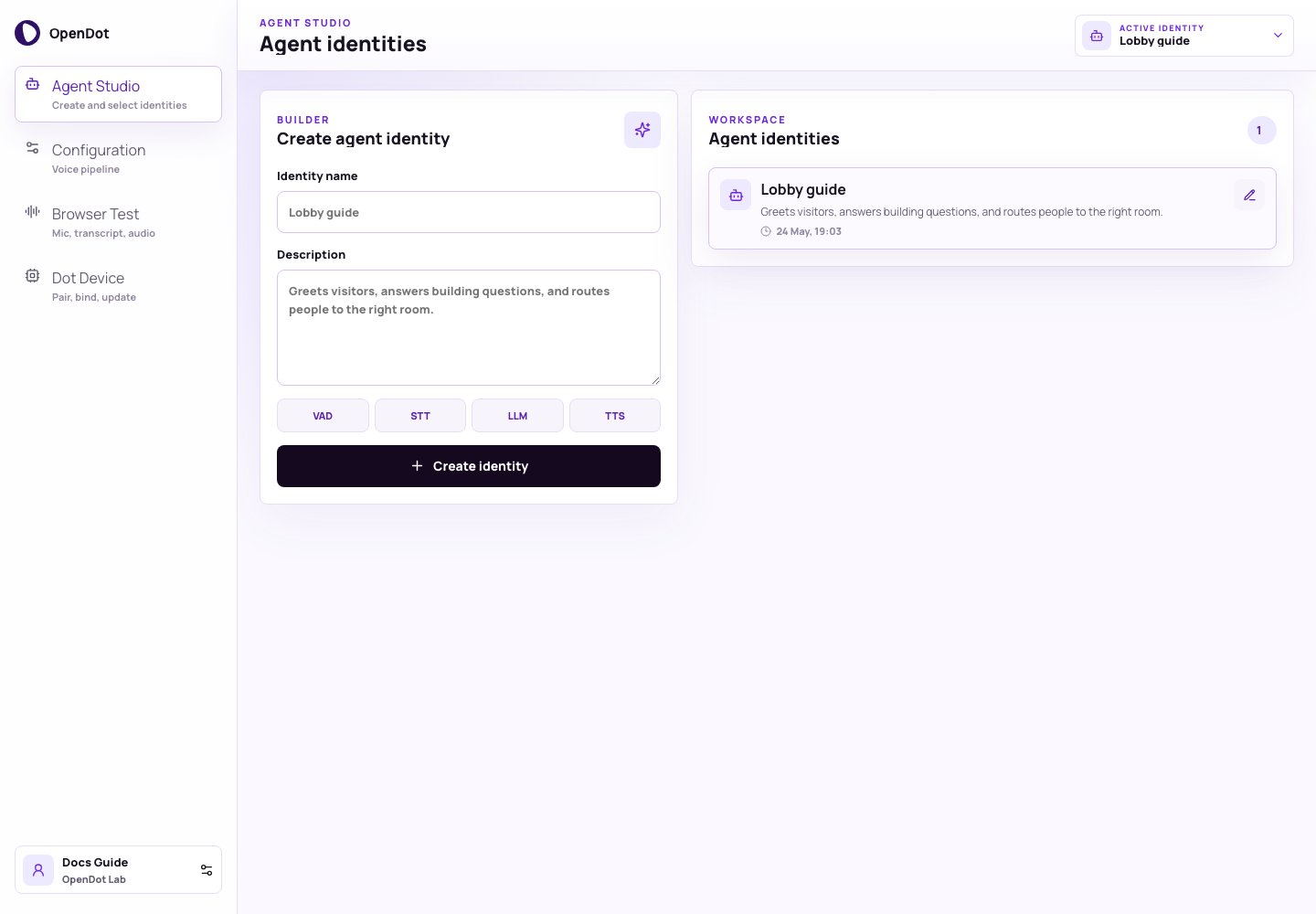
Agent Studio has two panels:
* **Create agent identity**: creates a new identity with a name and description.
* **Agent identities**: lists persisted identities, switches the active identity, and opens inline editing.
The active identity drives the rest of the console. Configuration edits its
pipeline, Browser Test authorizes runtime sessions for it, and Dot Device can
bind it to hardware. The same active identity selector appears in every
authenticated page header for quick switching.
## Create agent identity
Each identity starts with:
* **Identity name**: a short label such as `Lobby guide`
* **Description**: the job the agent should perform
When you click **Create identity**, OpenDot attaches the default Sandwich
architecture and four-stage pipeline:
```text theme={null}
VAD -> STT -> LLM -> TTS
```
The identity also receives normalized Speech-to-speech defaults so it can later
be switched to browser Realtime or the Dot device Realtime bridge without
changing the identity model.
The new identity becomes active immediately.
## Agent identities
Use the identity list to switch between saved identities. Each row shows the
identity name, description, and last update time. Selecting a row changes:
* which pipeline is edited in [Configuration](/configuration)
* which identity the console uses when it asks the platform API for a runtime
voice-session or realtime browser-session token in [Browser Test](/browser-test)
* which voice config can be bound to a device in [Dot Device](/dot-device)
Use the edit icon on a saved identity to update its name or description inline.
Saving creates a new draft version while preserving the current pipeline.
## Persistence model
The platform API persists each identity, selected architecture, realtime config,
and default pipeline in PostgreSQL as:
* `agents`
* `agent_versions`
* `pipelines`
* `pipeline_versions`
Editing an identity, architecture, realtime settings, or pipeline writes a new
draft version. Agent-level fields live in `agent_versions.manifest_json`, while
the explicit Sandwich stage settings remain in `pipeline_versions.manifest_json`.
The current prototype is still single-workspace, but the data model is already
shaped around durable agent and pipeline configuration rather than browser-only
state.
See [Database inspection](/database-inspection) to inspect the stored rows and
[Platform architecture](/architecture) for the full control-plane flow.
## Next phase
Open [Configuration](/configuration) to tune the active identity's Sandwich VAD,
STT, LLM, and TTS stages or switch it to Speech-to-speech for Browser Test and
bound Dot device turns.
## What you see in the UI
Agent Studio has two panels:
* **Create agent identity**: creates a new identity with a name and description.
* **Agent identities**: lists persisted identities, switches the active identity, and opens inline editing.
The active identity drives the rest of the console. Configuration edits its
pipeline, Browser Test authorizes runtime sessions for it, and Dot Device can
bind it to hardware. The same active identity selector appears in every
authenticated page header for quick switching.
## Create agent identity
Each identity starts with:
* **Identity name**: a short label such as `Lobby guide`
* **Description**: the job the agent should perform
When you click **Create identity**, OpenDot attaches the default Sandwich
architecture and four-stage pipeline:
```text theme={null}
VAD -> STT -> LLM -> TTS
```
The identity also receives normalized Speech-to-speech defaults so it can later
be switched to browser Realtime or the Dot device Realtime bridge without
changing the identity model.
The new identity becomes active immediately.
## Agent identities
Use the identity list to switch between saved identities. Each row shows the
identity name, description, and last update time. Selecting a row changes:
* which pipeline is edited in [Configuration](/configuration)
* which identity the console uses when it asks the platform API for a runtime
voice-session or realtime browser-session token in [Browser Test](/browser-test)
* which voice config can be bound to a device in [Dot Device](/dot-device)
Use the edit icon on a saved identity to update its name or description inline.
Saving creates a new draft version while preserving the current pipeline.
## Persistence model
The platform API persists each identity, selected architecture, realtime config,
and default pipeline in PostgreSQL as:
* `agents`
* `agent_versions`
* `pipelines`
* `pipeline_versions`
Editing an identity, architecture, realtime settings, or pipeline writes a new
draft version. Agent-level fields live in `agent_versions.manifest_json`, while
the explicit Sandwich stage settings remain in `pipeline_versions.manifest_json`.
The current prototype is still single-workspace, but the data model is already
shaped around durable agent and pipeline configuration rather than browser-only
state.
See [Database inspection](/database-inspection) to inspect the stored rows and
[Platform architecture](/architecture) for the full control-plane flow.
## Next phase
Open [Configuration](/configuration) to tune the active identity's Sandwich VAD,
STT, LLM, and TTS stages or switch it to Speech-to-speech for Browser Test and
bound Dot device turns.