> ## Documentation Index
> Fetch the complete documentation index at: https://docs.opendot.ai/llms.txt
> Use this file to discover all available pages before exploring further.
# Configuration
> Tune the active OpenDot agent identity for sandwich or realtime speech-to-speech voice sessions.
Configuration is the second page in the console workflow. It takes the active
agent identity from **Agent Studio** and turns it into an explicit voice runtime
configuration. The page separates the current modular pipeline from the realtime
speech-to-speech path so both architecture families can grow without collapsing
into one settings surface.
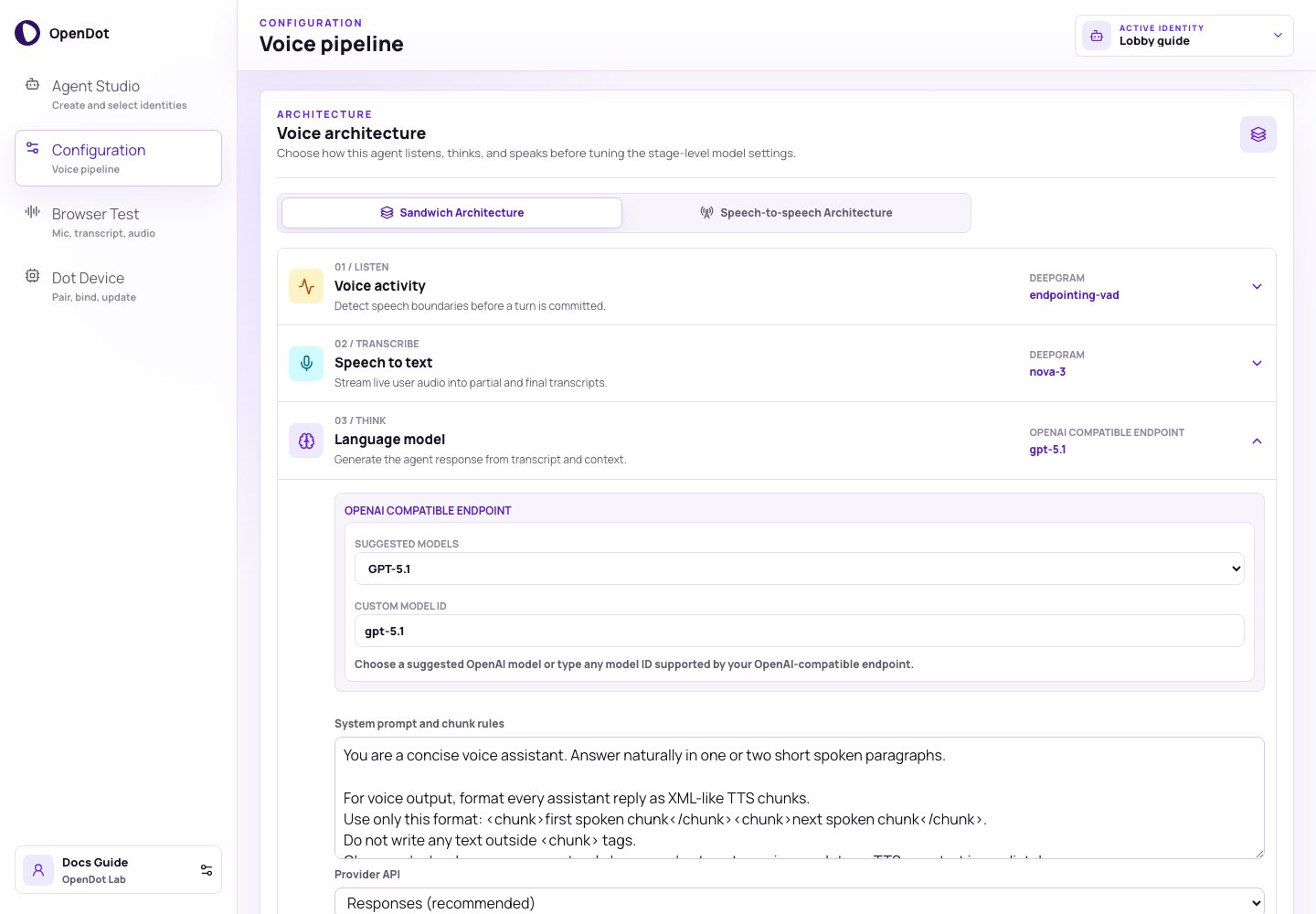 Every voice agent has to listen, think, and speak. OpenDot keeps the current
runtime explicit by using the Sandwich architecture:
```text theme={null}
VAD -> STT -> LLM -> TTS
```
The Speech-to-speech architecture mode saves OpenAI Realtime settings that
process audio input and produce audio output directly.
## What you see in the UI
The architecture selector has two modes:
* **Sandwich Architecture**: the active VAD, STT, LLM, and TTS configuration.
* **Speech-to-speech Architecture**: OpenAI Realtime model, voice, instructions,
reasoning effort, and turn-detection settings.
In Sandwich Architecture, each stage row has the same shape:
* stage number and icon
* listen, transcribe, think, or speak role
* provider and model preview
* dropdown settings
* emitted runtime events inside the expanded row
If no identity is selected, Configuration shows an empty state. Create or select
an agent identity in [Agent Studio](/agent-studio) first.
## Stage 1: Voice activity
| Field | Default | Purpose |
| -------------------------- | ----------------------------------------------- | ------------------------------------------------------------ |
| Provider | Deepgram | Uses Deepgram live listen options for turn detection. |
| Model | `endpointing-vad` | Keeps VAD visible as a product stage. |
| Endpointing | `300 ms` | Controls how quickly silence closes a turn. |
| Utterance end | `1000 ms` | Adds a safe pause for device conversations. |
| Turn events | `vad_events`, `interim_results`, `speech_final` | Enables runtime feedback and turn close events. |
| Noise floor | `2` characters | Ignores tiny transcript fragments. |
| Return device to wake word | enabled | Lets firmware leave active listening after a completed turn. |
If turns close too early, increase **Endpointing** or **Utterance end**. If
tiny noises trigger turns, raise **Noise floor**.
## Stage 2: Speech to text
| Field | Default | Purpose |
| ----------- | -------------- | ------------------------------------------ |
| Provider | Deepgram | Streams microphone or device audio to STT. |
| Model | `nova-3` | Default live transcription model. |
| Language | `en-US` | Recognition language. |
| Encoding | `linear16` | Browser runtime audio format. |
| Sample rate | `16000` | Input sample rate sent to the runtime. |
| Features | `smart_format` | Transcript formatting options. |
The Browser Test panel shows interim and final transcripts from this stage.
## Stage 3: Language model
| Field | Default | Purpose |
| ----------------------------- | ---------------------------------------------- | -------------------------------------------------------------------------------------------------------------------------------------- |
| Provider | OpenAI Compatible Endpoint | OpenAI-compatible response generation. |
| Model | `gpt-5-mini` | Suggested lower-latency OpenAI model or any custom compatible model id. |
| Provider API | Responses (recommended) | Selects `/responses` or `/chat/completions`. |
| API key name | `OPENAI_API_KEY` | Runtime environment variable used for auth. |
| Base URL | blank | Defaults to OpenAI; custom values append the selected API path. |
| Temperature | `1` | Sampling temperature sent to the provider. |
| Max output tokens | `512` | Response token cap. GPT-5-style reasoning models also spend this budget on reasoning tokens, so keep enough headroom for visible text. |
| System prompt and chunk rules | voice assistant prompt plus chunk instructions | Shapes the assistant response and TTS chunking. |
| Reasoning effort | `low` | Controls model reasoning behavior where supported. |
| Verbosity | `low` | Controls response density where supported. |
| Stop sequences | none | Optional stop strings, up to four. |
| JSON mode | disabled | Requests JSON object output from compatible providers. |
| Extra headers | none | Additional headers for the provider request. |
| Timeout | `70 s` | Per-request timeout before retry handling. |
| Max retries | `2` | Retry count for transient provider failures. |
| Requests per second | `50` | Runtime-side LLM request pacing. |
| Extra parameters | `{}` | Provider-specific JSON merged into the request body. |
The model control has two parts:
* **Suggested models**: current OpenAI model IDs such as `gpt-5-mini`,
`gpt-5.1`, `gpt-5`, and smaller GPT-5 / GPT-4.1 variants.
* **Custom model ID**: any model string supported by the configured
OpenAI-compatible endpoint.
Leave **Base URL** blank to use OpenAI at `https://api.openai.com/v1`. Set it
to a compatible provider base such as `https://example.com/v1` when the model is
served elsewhere. The runtime appends the selected Provider API path.
Use **Responses (recommended)** for the default OpenAI-compatible path. Use
**Chat Completions** when a provider only exposes the legacy-compatible chat
endpoint or when you need to test chat-specific compatibility.
The runtime expects assistant responses in XML-like chunks:
```xml theme={null}
First spoken phrase.Next spoken phrase.
```
Each closed chunk can be sent to TTS while the rest of the answer is still
streaming.
## Speech-to-speech
Speech-to-speech keeps the existing agent identity but changes live audio
transport for supported surfaces. Browser Test uses OpenAI Realtime over native
browser WebRTC. Bound Dot devices keep the existing `/ws` firmware protocol and
let the runtime bridge Opus audio to OpenAI Realtime server-side.
| Field | Default | Purpose |
| ------------------ | ----------------------- | ----------------------------------------------- |
| Provider | OpenAI Realtime | Runtime-minted client secrets stay server-side. |
| Model | `gpt-realtime-2` | Capable realtime speech-to-speech default. |
| Voice | `marin` | Default realtime voice. |
| Reasoning effort | `low` | Applies to `gpt-realtime-2`. |
| Turn detection | `semantic_vad` | Natural turn-taking with model-side VAD. |
| Semantic eagerness | `auto` | Controls semantic VAD response timing. |
| Create response | enabled | Lets VAD automatically trigger a response. |
| Interrupt response | enabled | Lets user speech interrupt model audio. |
| Instructions | OpenDot realtime prompt | Kept separate from sandwich XML chunk rules. |
`gpt-realtime-mini` is selectable for cheaper repeated testing. `cedar` and
the other realtime voices are selectable from the same settings surface.
Speech-to-speech Dot sessions use `OPENAI_API_KEY` inside the runtime and do
not require Deepgram for the live turn.
## Stage 4: Text to speech
| Field | Default | Purpose |
| ---------------- | ------------------- | ------------------------------------------------- |
| Provider | Deepgram | Synthesizes assistant text into audio. |
| Model | `aura-2-thalia-en` | Default starter voice. |
| Encoding | `mp3` | Output audio encoding. |
| Sample rate | `24000` | Runtime TTS sample rate. |
| Browser delivery | chunked audio files | Browser playback mode. |
| Chunk style | fast phrases | Controls how short streamed TTS chunks should be. |
Use `Linear16 PCM` with `Direct PCM stream` when you want raw PCM playback in
the browser. Other encodings are retained as chunked audio files for playback.
## What gets persisted
Changing Configuration updates the active identity through the platform API. The
API writes a new draft version for the agent and a new draft pipeline version in
PostgreSQL. Architecture and realtime settings live in the agent version
manifest; the VAD, STT, LLM, and TTS stages remain in the pipeline version
manifest. The runtime later loads the authorized version when Browser Test opens
a voice session or a Dot device connects with valid credentials.
See [Platform architecture](/architecture) for the full system boundary and
[Browser Test](/browser-test) for the next step in the UI workflow.
Every voice agent has to listen, think, and speak. OpenDot keeps the current
runtime explicit by using the Sandwich architecture:
```text theme={null}
VAD -> STT -> LLM -> TTS
```
The Speech-to-speech architecture mode saves OpenAI Realtime settings that
process audio input and produce audio output directly.
## What you see in the UI
The architecture selector has two modes:
* **Sandwich Architecture**: the active VAD, STT, LLM, and TTS configuration.
* **Speech-to-speech Architecture**: OpenAI Realtime model, voice, instructions,
reasoning effort, and turn-detection settings.
In Sandwich Architecture, each stage row has the same shape:
* stage number and icon
* listen, transcribe, think, or speak role
* provider and model preview
* dropdown settings
* emitted runtime events inside the expanded row
If no identity is selected, Configuration shows an empty state. Create or select
an agent identity in [Agent Studio](/agent-studio) first.
## Stage 1: Voice activity
| Field | Default | Purpose |
| -------------------------- | ----------------------------------------------- | ------------------------------------------------------------ |
| Provider | Deepgram | Uses Deepgram live listen options for turn detection. |
| Model | `endpointing-vad` | Keeps VAD visible as a product stage. |
| Endpointing | `300 ms` | Controls how quickly silence closes a turn. |
| Utterance end | `1000 ms` | Adds a safe pause for device conversations. |
| Turn events | `vad_events`, `interim_results`, `speech_final` | Enables runtime feedback and turn close events. |
| Noise floor | `2` characters | Ignores tiny transcript fragments. |
| Return device to wake word | enabled | Lets firmware leave active listening after a completed turn. |
If turns close too early, increase **Endpointing** or **Utterance end**. If
tiny noises trigger turns, raise **Noise floor**.
## Stage 2: Speech to text
| Field | Default | Purpose |
| ----------- | -------------- | ------------------------------------------ |
| Provider | Deepgram | Streams microphone or device audio to STT. |
| Model | `nova-3` | Default live transcription model. |
| Language | `en-US` | Recognition language. |
| Encoding | `linear16` | Browser runtime audio format. |
| Sample rate | `16000` | Input sample rate sent to the runtime. |
| Features | `smart_format` | Transcript formatting options. |
The Browser Test panel shows interim and final transcripts from this stage.
## Stage 3: Language model
| Field | Default | Purpose |
| ----------------------------- | ---------------------------------------------- | -------------------------------------------------------------------------------------------------------------------------------------- |
| Provider | OpenAI Compatible Endpoint | OpenAI-compatible response generation. |
| Model | `gpt-5-mini` | Suggested lower-latency OpenAI model or any custom compatible model id. |
| Provider API | Responses (recommended) | Selects `/responses` or `/chat/completions`. |
| API key name | `OPENAI_API_KEY` | Runtime environment variable used for auth. |
| Base URL | blank | Defaults to OpenAI; custom values append the selected API path. |
| Temperature | `1` | Sampling temperature sent to the provider. |
| Max output tokens | `512` | Response token cap. GPT-5-style reasoning models also spend this budget on reasoning tokens, so keep enough headroom for visible text. |
| System prompt and chunk rules | voice assistant prompt plus chunk instructions | Shapes the assistant response and TTS chunking. |
| Reasoning effort | `low` | Controls model reasoning behavior where supported. |
| Verbosity | `low` | Controls response density where supported. |
| Stop sequences | none | Optional stop strings, up to four. |
| JSON mode | disabled | Requests JSON object output from compatible providers. |
| Extra headers | none | Additional headers for the provider request. |
| Timeout | `70 s` | Per-request timeout before retry handling. |
| Max retries | `2` | Retry count for transient provider failures. |
| Requests per second | `50` | Runtime-side LLM request pacing. |
| Extra parameters | `{}` | Provider-specific JSON merged into the request body. |
The model control has two parts:
* **Suggested models**: current OpenAI model IDs such as `gpt-5-mini`,
`gpt-5.1`, `gpt-5`, and smaller GPT-5 / GPT-4.1 variants.
* **Custom model ID**: any model string supported by the configured
OpenAI-compatible endpoint.
Leave **Base URL** blank to use OpenAI at `https://api.openai.com/v1`. Set it
to a compatible provider base such as `https://example.com/v1` when the model is
served elsewhere. The runtime appends the selected Provider API path.
Use **Responses (recommended)** for the default OpenAI-compatible path. Use
**Chat Completions** when a provider only exposes the legacy-compatible chat
endpoint or when you need to test chat-specific compatibility.
The runtime expects assistant responses in XML-like chunks:
```xml theme={null}
First spoken phrase.Next spoken phrase.
```
Each closed chunk can be sent to TTS while the rest of the answer is still
streaming.
## Speech-to-speech
Speech-to-speech keeps the existing agent identity but changes live audio
transport for supported surfaces. Browser Test uses OpenAI Realtime over native
browser WebRTC. Bound Dot devices keep the existing `/ws` firmware protocol and
let the runtime bridge Opus audio to OpenAI Realtime server-side.
| Field | Default | Purpose |
| ------------------ | ----------------------- | ----------------------------------------------- |
| Provider | OpenAI Realtime | Runtime-minted client secrets stay server-side. |
| Model | `gpt-realtime-2` | Capable realtime speech-to-speech default. |
| Voice | `marin` | Default realtime voice. |
| Reasoning effort | `low` | Applies to `gpt-realtime-2`. |
| Turn detection | `semantic_vad` | Natural turn-taking with model-side VAD. |
| Semantic eagerness | `auto` | Controls semantic VAD response timing. |
| Create response | enabled | Lets VAD automatically trigger a response. |
| Interrupt response | enabled | Lets user speech interrupt model audio. |
| Instructions | OpenDot realtime prompt | Kept separate from sandwich XML chunk rules. |
`gpt-realtime-mini` is selectable for cheaper repeated testing. `cedar` and
the other realtime voices are selectable from the same settings surface.
Speech-to-speech Dot sessions use `OPENAI_API_KEY` inside the runtime and do
not require Deepgram for the live turn.
## Stage 4: Text to speech
| Field | Default | Purpose |
| ---------------- | ------------------- | ------------------------------------------------- |
| Provider | Deepgram | Synthesizes assistant text into audio. |
| Model | `aura-2-thalia-en` | Default starter voice. |
| Encoding | `mp3` | Output audio encoding. |
| Sample rate | `24000` | Runtime TTS sample rate. |
| Browser delivery | chunked audio files | Browser playback mode. |
| Chunk style | fast phrases | Controls how short streamed TTS chunks should be. |
Use `Linear16 PCM` with `Direct PCM stream` when you want raw PCM playback in
the browser. Other encodings are retained as chunked audio files for playback.
## What gets persisted
Changing Configuration updates the active identity through the platform API. The
API writes a new draft version for the agent and a new draft pipeline version in
PostgreSQL. Architecture and realtime settings live in the agent version
manifest; the VAD, STT, LLM, and TTS stages remain in the pipeline version
manifest. The runtime later loads the authorized version when Browser Test opens
a voice session or a Dot device connects with valid credentials.
See [Platform architecture](/architecture) for the full system boundary and
[Browser Test](/browser-test) for the next step in the UI workflow.